With the release of the URSA Cine Immersive, Blackmagic Design has introduced an innovative camera designed to capture Apple Immersive Video, a core pillar of Apple’s Vision Pro platform. The camera uses dual 8K sensors to record stereoscopic immersive footage at 90 FPS in the Blackmagic RAW (BRAW) format. While these technologies significantly advance immersive video production, they also impose storage requirements that only cutting-edge, high-performance solutions can meet.
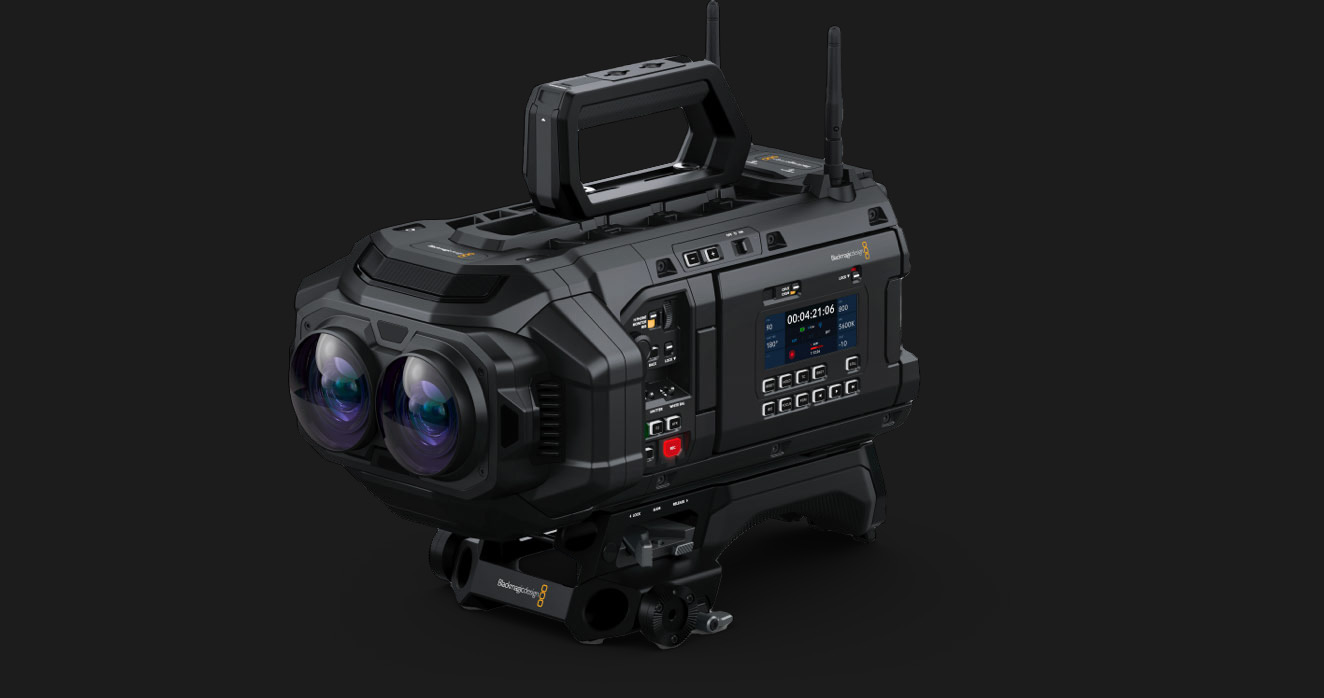
In this blog, we explore the requirements of the URSA Cine Immersive, with a particular focus on shared storage, and explain how ELEMENTS’ solutions enable real-time Apple Vision Pro workflows.
Challenges
To deliver a hyper-realistic VR experience on Apple Vision Pro, the Blackmagic URSA Cine Immersive records stereoscopic video using two streams at 8K resolution and a frame rate of 90 fps. Recording in a RAW codec results in extremely high data rates that can reach multiple gigabytes per second. When using the constant bitrate 5:1 preset, bitrates can reach up to 3.203 MB/s. With the constant quality Q0 preset, the bitrate increases further to up to 4.003 MB/s. Working with footage at these bitrates is only feasible on high-performance storage solutions. The performance demands increase significantly in shared environments, where multiple systems access the same media simultaneously.
Just as important as having high-performance storage is having a way to deliver this performance to the post-production suites in a way that enables real time playback. A simple calculation shows that the trusty 10 Gig line will not be sufficient for real time playback. For this kind of bitrates a faster connection will be required, preferably coupled with a higher-performance network protocol than the standard NAS protocols.
Solving storage
Working with URSA Cine Immersive footage in a shared environment, without relying on proxy-based offline workflows, is only possible with truly high-performance storage solutions. For this reason, flash storage, preferably NVMe-based, is essential. It can sustain the extremely high data transfer rates required, preventing dropped frames during recording and avoiding latency during post-production.
ELEMENTS offers multiple solutions that provide more than enough performance for Apple Vision Pro workflows. The flexibility of our ecosystem allows us to combine multiple storage products and storage media into a single, unified environment that supports the entire post-production process, from both on-set and in-house ingest through editing and collaboration, and ultimately archiving. By combining different types of storage and optionally integrating cloud storage, this environment will deliver extreme performance while providing large capacity with maximum efficiency. The centrepiece of your ELEMENTS environment is chosen according to your specific needs.
Peak performance
Delivering over 70 gigabytes per second of internal performance from a single 2U node, the NVMe-based ELEMENTS BOLT is a perfect solution for projects with extreme performance demands. It effortlessly handles workflows that would overwhelm other storage systems, including those with a large number of parallel accesses, high-resolution frame stack formats such as DPX and EXR, and high-bandwidth footage like that produced by the Blackmagic URSA Cine Immersive camera.

Both performance and capacity can be scaled by adding any number of BOLT nodes without downtime. Additional bulk capacity can be seamlessly added to the BOLT environment through the integration of cost-effective HDD-based storage.
On-set ingest
For deployments outside your facility, such as on set, in OB vans, or in other mobile production scenarios where Blackmagic URSA Cine Immersive footage needs to be ingested and edited, ELEMENTS CUBE is an ideal solution. This portable NVMe- or SSD-based NAS delivers extreme performance in a form factor compact enough for carry-on baggage.

A direct connection to the CUBE enables fast and straightforward ingest, while editors can already preview and organize the footage. Once back at the office, the Automation Engine makes it easy to transfer the media to the main storage system and continue working exactly where you left off.
Other considerations
While high-performance storage is an obvious requirement for workflows involving footage with extremely high bitrates, delivering that performance to the editing or color grading suite is just as important. A high-speed network infrastructure is required not only to enable real-time playback, but also to support data management tasks such as ingest, backup, and archiving of footage. Moving multi-terabyte sessions from on-set storage to editing storage should not take days, and media should not accumulate faster than it can be processed and moved through the pipeline.
With files as large as those produced by the URSA Cine Immersive, a capable archive solution can prevent both financial and time losses by avoiding unnecessary egress costs and long restore times. After footage is moved to an archive, whether in the cloud or on LTO tape, it is important to keep it well organized and ideally be able to preview it before committing to a multi-terabyte restore job.
Advanced networking
The actual performance of your storage connection depends not only on your network infrastructure and the performance ratings of the installed hardware, but also on the protocol used to transmit data between the server and the client. This is an important detail because of the inefficiencies in standard NAS protocols, which do not allow you to fully utilize your Ethernet connection.
To address this, we developed ELEMENTS BLINK, a BeeGFS-native client for macOS and Windows. BLINK enables full utilization of the available Ethernet connection and delivers significantly higher throughput with lower latency, as well as a more stable connection compared to file-level access using traditional NAS protocols.
With BLINK, you can work with demanding footage such as that from the URSA Cine Immersive without playback issues and without having to rely on a more complex and expensive Fibre Channel infrastructure.
Powerful data assistant
Every ELEMENTS system comes with a powerful yet intuitive and easy-to-use Automation Engine that allows you to automate any task. It is an ideal tool for managing the full lifecycle of your footage, automating ingest, backup, management, and archiving workflows while preserving metadata and keeping stakeholders informed of progress.

Consider the following example use case. While on set, footage from the URSA Cine Immersive is recorded directly onto the ELEMENTS CUBE. The Automation Engine detects completed clips, enriches them with metadata like project details, recording team, and usage rights, and then triggers a high-speed UDP transfer using tools such as ExpeDat to the office storage. Once the footage has been transferred, selected users are automatically notified via email, Slack, or any other chosen channel. This is just one example of how the Automation Engine can meaningfully enhance your workflows.
Track and use your media
ELEMENTS Media Library is a powerful Media Asset Manager that is both easy to use and extremely capable. It allows users not only to preview footage, but also to collaborate, search for specific clips, add metadata, create rough cuts, and much more. It allows users who are not experts in DaVinci Resolve to preview and work with URSA Cine Immersive footage from anywhere in the world.
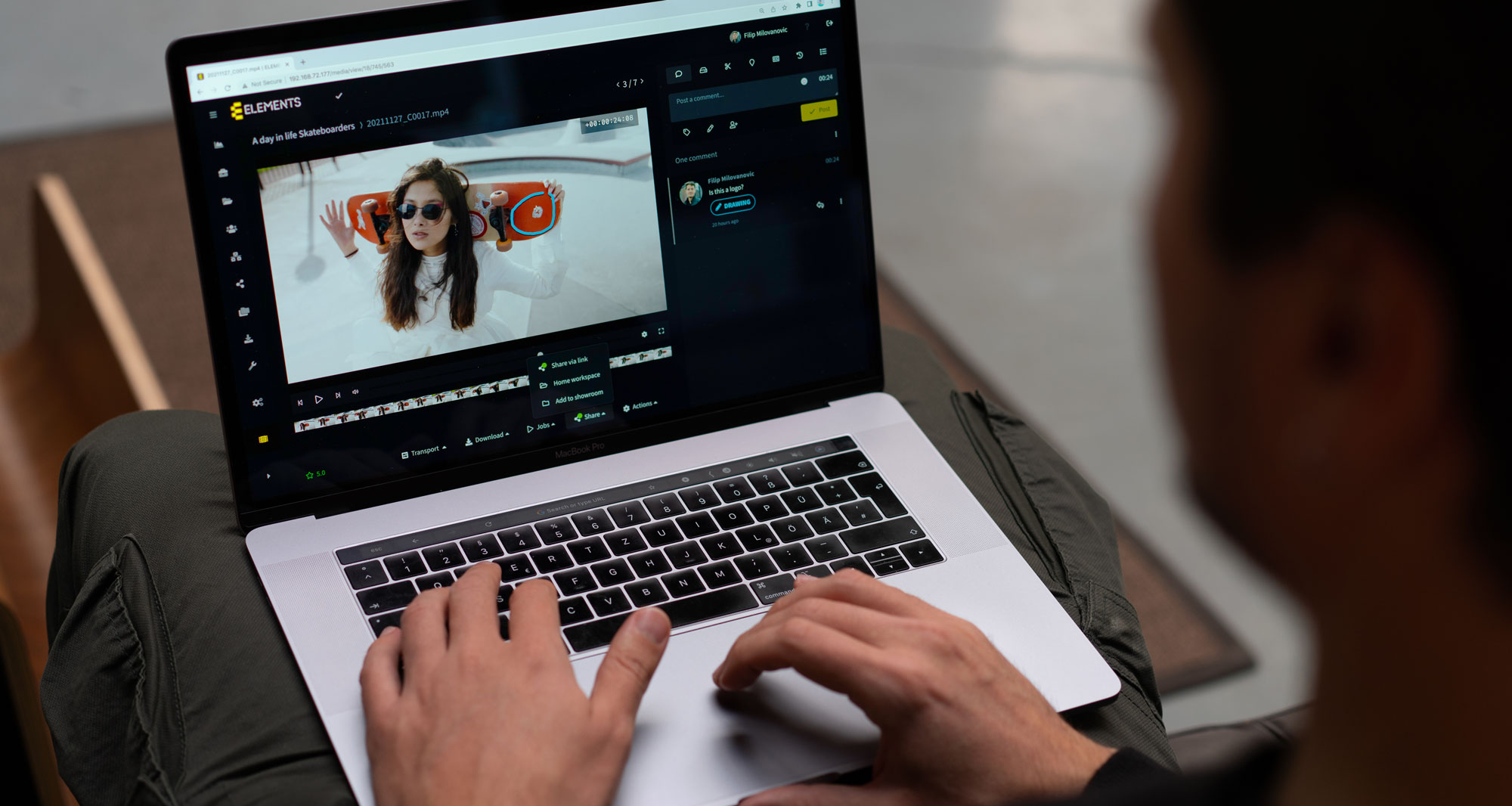
Advanced sharing features enable efficient approval workflows, and the use of lightweight proxies makes it perfect for creating searchable archives that allow footage to be previewed even after it has been moved to a cloud archive.
Conclusion
Producing content for Apple Vision Pro with the Blackmagic URSA Cine Immersive camera requires a cutting-edge storage environment capable of handling the extreme data rates of high-resolution stereoscopic footage. For these demanding requirements, the ultra-fast NVMe-based ELEMENTS BOLT along with the portable on-set NVMe NAS ELEMENTS CUBE, are ideal storage solutions. The advantages of an ELEMENTS environment become even clearer when the high-performance storage is combined with ELEMENTS BLINK, a highly efficient network protocol, and workflow tools such as the Automation Engine and the Media Library for intuitive asset management and collaboration.
Together, these tools ensure that teams can capture, manage, edit, and archive high-bitrate immersive VR footage efficiently, without compromising performance. With ELEMENTS, every step of the Vision Pro production pipeline is fully supported, making high-end immersive workflows both achievable and streamlined.
More blogs on the Media Library and the Automation Engine:
Discover New and Improved ELEMENTS Plugins for Premiere Pro and Resolve
Examining the Media Library’s Rough-cut Editor
Media Library Use Case: Coordinating the Production Process
Workflow Automation Use Case: Consolidate Media into Cloud
Workflow Automation Use Case: Secure Upload


